
Design Your Own Scenarios
This page shows how to write a new de.scenario/1 file, run it, read
the PASS/FAIL evidence, and fix it. Read Architecture and Design
first if you do not know the words block, sim, transport and
journal.
The full reference for every key, step, fault and assertion is
docs/SCENARIOS.md in the Studio repository. ./sim verbs prints
the same list from the engine.
Step 1 - Write down what PASS proves
Before you write YAML, write one sentence:
“When <this happens> to <these units>, the fleet must <do this>, and I see it in <this evidence>.”
Example: “When copter c1 loses its server link for 15 s during a mission, the mission must still complete, and the link monitor must see c1 offline.”
This sentence becomes the first comment of the file. It is
required: the first line of each file must be a # comment that
tells what the file proves.
Step 2 - Make the file
./sim new my_link_test
This writes scenarios/my_link_test.yaml from the template. Put your
own files in scenarios/. Use tests/ only for cases that CI must
run.
Note
All paths in the file are relative to the file. A file in
scenarios/ uses ../packages/.... A file in
scenarios/examples/ uses ../../packages/....
Step 3 - Select the transport
Use |
When |
|---|---|
|
the default choice: real routing through the real comm server |
|
link cuts, stalls and delay on the real server |
|
packet loss ( |
|
take the fleet and the server from a |
Step 4 - Describe the fleet
Each unit has an id and a cls. cls is copter, plane,
rover, static, comm_only, or the name of a block (for
example boat or copter_camera).
fleet:
  - {id: c1, cls: copter}
  - {id: c2, cls: copter, at: {north_m: 0, east_m: 40}}   # 40 m east of home
  - {id: b1, cls: boat}
  - {id: s1, cls: static}                                 # ground node, no SITL
Optional unit keys: role, modules (add stubs such as
stub_ai_box), params (flight controller parameters),
config (module config overlay), home, account,
fcb_proxy: true, fcb_link.
Step 5 - Write the timeline
Each step is {t: <seconds>, do: <step>, ...} or
{t: <seconds>, fault: <kind>, ...}. t counts from the start of
the scenario. The clock starts after bring-up.
timeline:
  - {t: 0,  do: mode, unit: c1, mode: GUIDED}   # GUIDED before a nav deploy
  - {t: 2,  do: deploy}                         # send the operation
  - {t: 6,  do: arm, unit: c1}                  # arm waits for GPS warm-up
  - {t: 9,  do: start}                          # start the mission
  - {t: 20, fault: link_cut, unit: c1, dur_s: 15}
  - {t: 25, do: wait_journal, unit: c1, re: "mission main completed",
     timeout: 300}
Steps you use most:
Step |
Meaning |
|---|---|
|
flight controller commands ( |
|
operator actions on the operation |
|
wait for time, a journal line, a module log line, or a unit |
|
process faults ( |
|
send an event to a unit |
|
act as the operator: |
Faults you use most: link_cut, link_stall, loss, delay,
server_down, module_kill, battery, gps_off, gps_jam,
gps_glitch, motor_out, rc_fail, compass_fail,
vibration. dur_s restores the fault automatically where it
applies.
unit: accepts a unit id, its position (1), block:<name>, a
comma list, or all.
Tip
To react to an event, use a journal trigger in place of a time:
- {on: {unit: s1, re: "comm line offline"},
   do: fire, event: go.now, once: true}
The runner checks triggers only between steps. A long wait
blocks them. Use wait_journal with a timeout.
Step 6 - Write the assertions
Assertions are the proof. Each one is {name: {args}}.
assert:
  - journal_count: {unit: c1, re: "mission main completed", equals: 1}
  - link_offline:  {unit: c1, at_least: 1}
  - proc_alive:    {unit: c1, proc: de_comm}
Assertion |
Checks |
|---|---|
|
how many journal lines match |
|
the pattern never appears |
|
line |
|
the time between two lines ( |
|
the monitor saw the unit drop offline |
|
process state at the end |
|
the last flight controller mode |
|
a telemetry field in bounds ( |
|
no process restarted outside a fault window |
|
link and telemetry come back within |
Important
A journal re: pattern matches only the message text of a line.
It does not search the time stamp and header fields. Use a pattern
such as "mission main completed" or "comm line offline".
Step 7 - Add the teardown and settle time
settle_s: 20        # quiet seconds after the last step
teardown: land      # land | reset | none
Use teardown: land for everything that flies or drives. A fleet
that stays in the air drains its battery and breaks the next run.
The complete file
This is the full example from docs/SCENARIOS.md:
# demo_fault - one copter loses its link mid-mission: the square must
# still complete (missions are autonomous) and the link monitor must
# have seen the unit offline.
version: 1
name: demo_fault
transport: fake
operation: ../packages/copter_square.json
verify: {cli: ../tools/verify_wrap.js}
settle_s: 20
fleet:
  - {id: c1, cls: copter}
timeline:
  - {t: 0,  do: mode, unit: c1, mode: GUIDED}
  - {t: 2,  do: deploy}
  - {t: 6,  do: arm, unit: c1}
  - {t: 9,  do: start}
  - {t: 20, fault: link_cut, unit: c1, dur_s: 15}
  - {t: 25, do: wait_journal, unit: c1, re: "mission main completed",
     timeout: 300}
assert:
  - journal_count: {unit: c1, re: "mission main completed", equals: 1}
  - link_offline: {unit: c1, at_least: 1}
  - proc_alive: {unit: c1, proc: de_comm}
teardown: land
For more examples, copy a file from scenarios/examples/
(mission_square, link_fault, unexpected_restart,
wp_reached_action) or from tests/ (smoke_copters,
smoke_boat, fault_link_loss).
Step 8 - Validate, then run
./sim validate scenarios/my_link_test.yaml   # schema + files, starts nothing
./sim run scenarios/my_link_test.yaml
validate finds an unknown step, fault or assertion, a wrong
argument, a missing file, or a fault that the transport does not
support. Fix all validate errors before you run.
Useful run flags:
./sim run <file> --seed 7       # a different seed (ports, faults, world)
./sim run <file> --keep         # keep the fleet up after the run
./sim run <file> --hold         # park after the timeline until Ctrl-C
./sim run <file> --shared       # do not stop the other live sims
./sim expand <file> --seed 7    # print the chaos fault schedule, run nothing
Step 9 - Read the evidence
Read the evidence in this order.
The console. Each timeline step prints a line. Each
wait_journalprints when it matched. The== assertions ==block prints[PASS],[FAIL]or[SKIP]with a detail, for examplejournal_count: value=1.0 (c1: 1 == 1). The last lines are the count (5 PASS, 0 FAIL, 0 SKIP) andRESULT <dir>/summary.json.summary.json. Each assertion has
name,status,valueanddetail.step_oktells if all steps passed.exitis the exit code.commitsgives the commit of each component, so you know which build you tested.The unit journal in
var/results/<utc>/<name>/<unit>/. It is the diary of each unit. Search it for the line your assertion expected.The module logs for the real error:
./sim logs <unit>
<module>
while the fleet is up, or the log files in the results folder.links.jsonl,telemetry.jsonlandoperator.logfor link, flight and operator evidence.
When the run uses the WebClient (for example with --hold or
./sim view), you can also read the evidence live in the RUN
view:
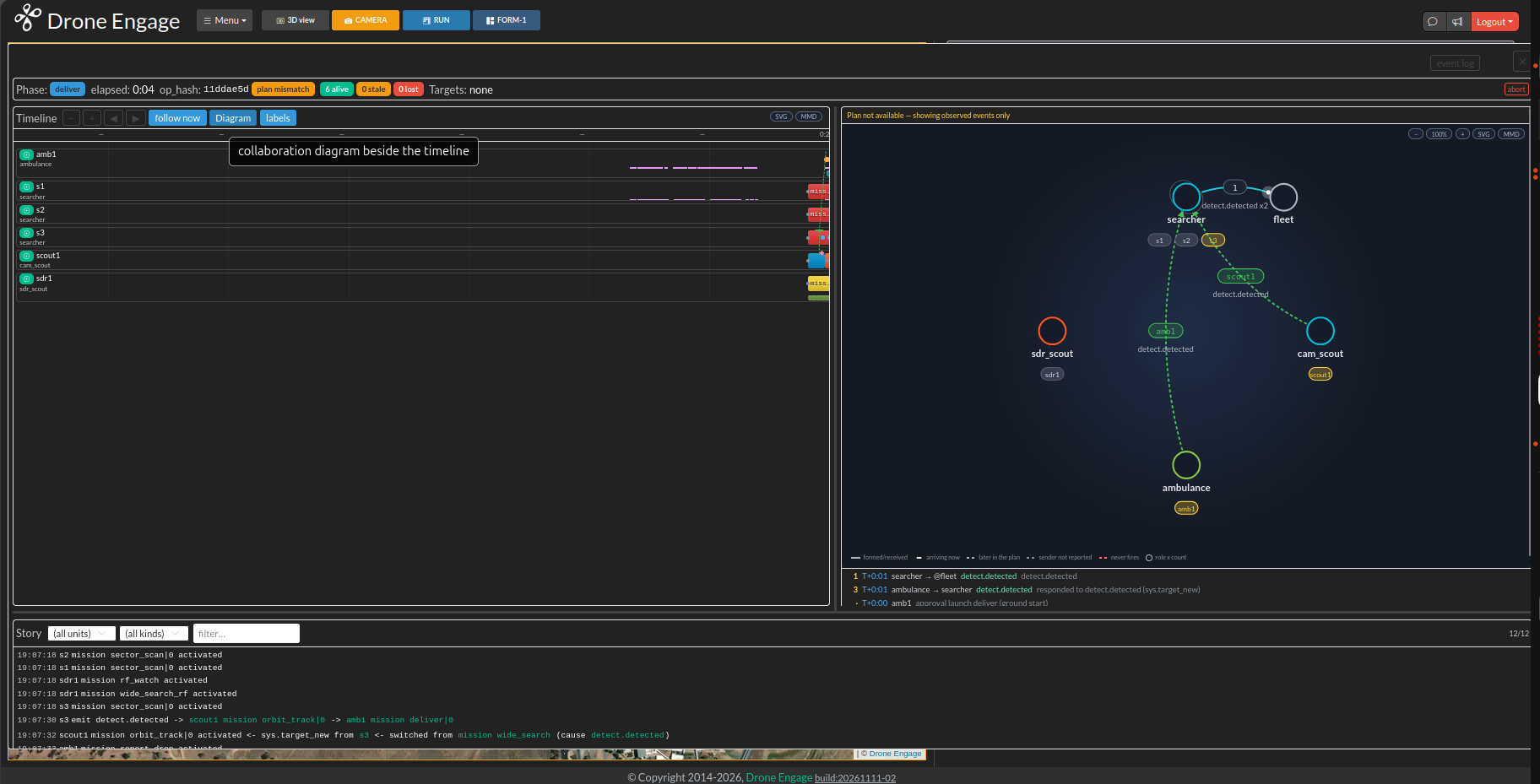
The RUN view early in sar_fleet_a. The story at the bottom shows
the journal lines in time order, for example s3 emit
detect.detected. Use these lines to write your re: patterns.
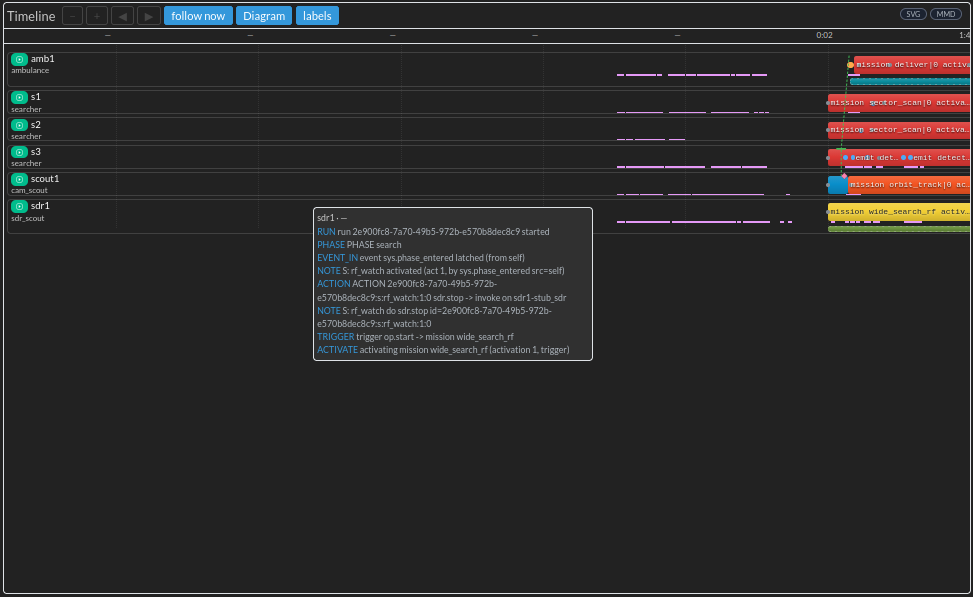
Move the mouse over a mark in the timeline to see the journal lines
behind it. Here sdr1 starts the run, enters the search phase
and activates the wide_search_rf mission.
Note
SKIP is not FAIL. A test that needs a capability this machine does
not have (requires:) SKIPs with the reason. A timing assertion
in a realtime: true file SKIPs when SITL cannot run at 1x speed.
Step 10 - Fix it
What you see |
What to do |
|---|---|
|
Use |
|
Give a larger |
The deploy is refused |
Set |
|
Open the unit journal. Check that your |
|
The fleet was reused and an old run was still loaded. Add
|
|
Add |
|
A process restarted outside a |
Results change from run to run |
Set |
To try a new module build without a full rebuild of the fleet, use:
./sim try scenarios/my_link_test.yaml --module de_mavlink=<path-to-binary>
try is run --keep, so you can look at the live fleet after the
run with ./sim ctl status.
Step 11 - Make it strong
Run it with several seeds:
./sim suite scenarios/my_folder --seeds 1,2,3.Add a negative control: one assertion that must fail when the feature is broken (for example
journal_count ... equals: 0for a line that must never appear).When the file is stable and CI must run it, move it to the correct feature folder under
tests/(faults/,missions/,fleet_bus/…).
Record a session in place of writing it
You can fly a sim by hand in the WebClient and let the Studio write the timeline:
./sim record sims/copters3.yaml -o scenarios/my_recording.yaml
# drive the WebClient, then push Ctrl-C
./sim validate scenarios/my_recording.yaml
./sim run scenarios/my_recording.yaml
Each WebClient command becomes a timeline step (deploy, arm,
mode, start …). A command with no verb stays in the file as a
# unmapped: comment. The assert: block is a TODO: the recording
cannot know what you wanted to check, so you must write it.
record works on server: {type: real} sims. It refuses a
fake server. On an external server it prints one line that you
add to your own server’s command_plugin.
Next step: Use an AI Assistant (LLM Prompts).