Andruav GPS Injection
Your drone-side phone already has a capable multi-constellation GNSS receiver.
With GPS Injection, Andruav sends the phone’s GPS fix to the ArduPilot flight
controller over MAVLink (GPS_INPUT), so the flight controller can use the
phone as its GPS — either as its only GPS, or as a second GPS next to a real
receiver.
Warning
A phone’s GPS is usually less accurate than a dedicated GPS module — phones typically report 5–15 m horizontal accuracy even under open sky. Test on the ground (or in SITL) before you rely on it in flight, and keep a safe non-GPS flight mode ready.
Requirements
The drone-side phone runs Andruav on Android 8.0 (Oreo) or later — the option is disabled on older Android versions.
The phone has GNSS hardware and Andruav has precise location permission.
Andruav is connected to an ArduPilot flight controller — see Andruav Getting Started.
The phone has a clear view of the sky. Indoors the phone usually has no GPS fix, and Andruav then sends nothing.
Step 1 — Configure the flight controller
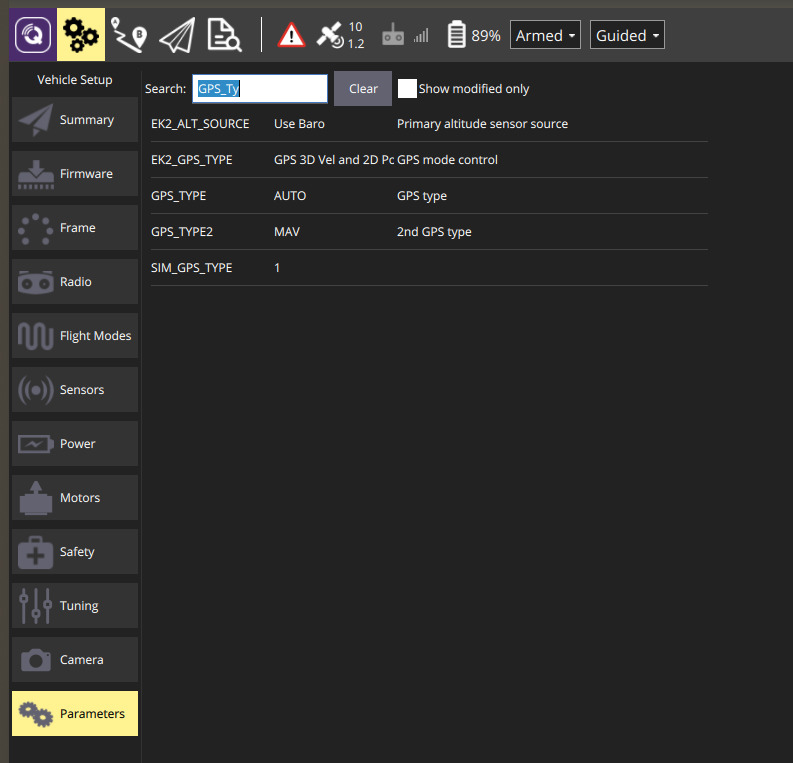
Set the flight controller’s GPS type to MAVLink (14) with Mission Planner or QGroundControl, then reboot the flight controller.
Parameter |
Value |
Use |
|---|---|---|
|
|
The phone is the primary GPS. |
|
|
The phone is a second GPS next to a real GPS receiver. |
Tip
Calibrate the compass with the phone mounted in its final position.
A phone close to the compass disturbs it, and ArduPilot will then refuse to
arm with PreArm: Check mag field.
Step 2 — Enable GPS Injection in Andruav
On the drone-side phone open Drone Settings → FCB & Telemetry and enable GPS Injection.
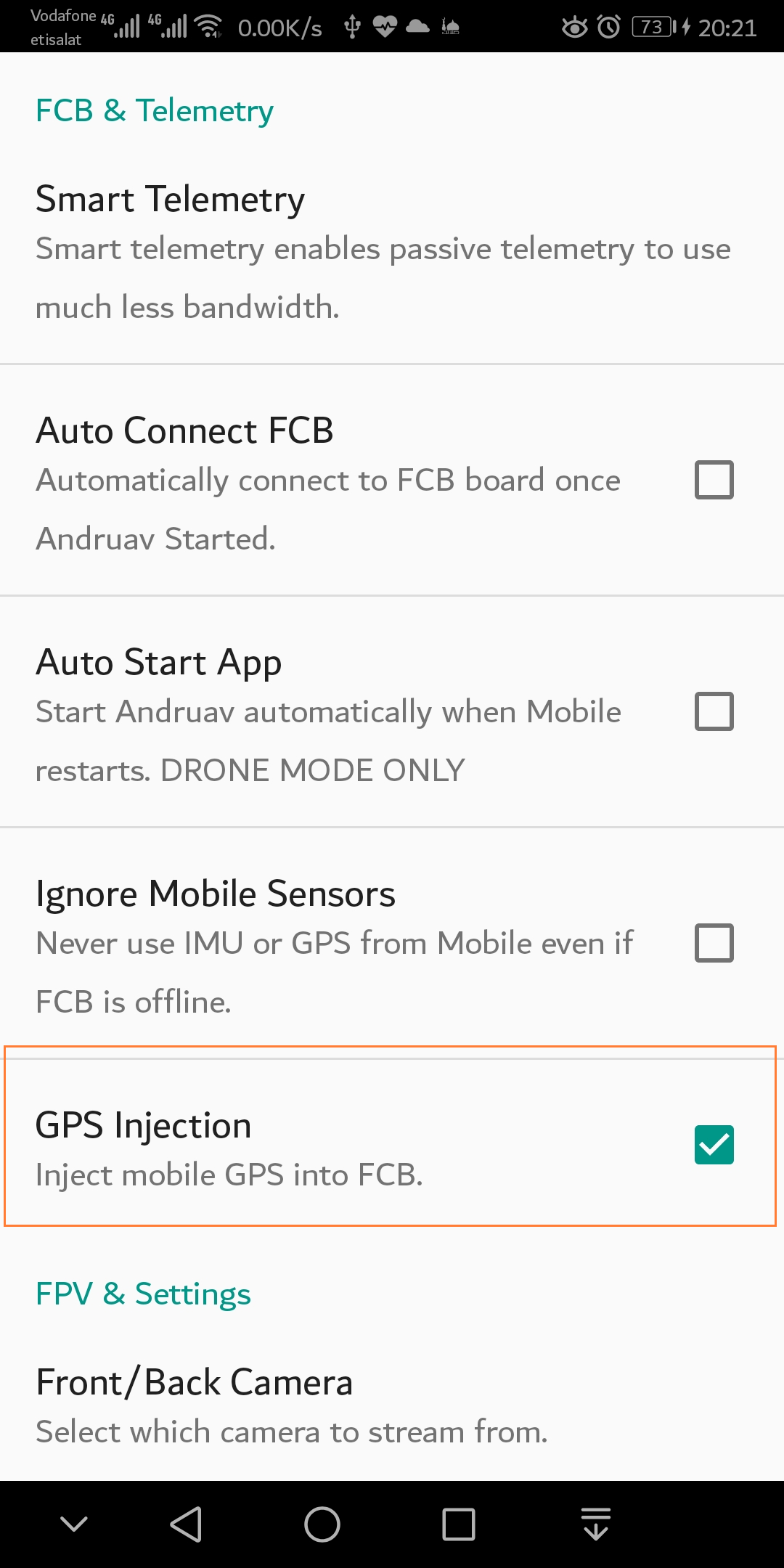
Once the flight controller is connected, the GPS Injection description shows whether the flight controller will accept the phone’s GPS:
✓ Flight controller GPS1_TYPE is set to MAVLink (14)— ready.⚠ Flight controller is not set to receive it: GPS_TYPE=…, GPS_TYPE2=…— go back to Step 1; until the GPS type is 14 the injected GPS is ignored.
Related options in the same section:
Ignore Mobile Sensors must be off — it switches the phone’s GPS off, so the two options cannot be enabled together.
Inject Heading also sends the phone’s compass heading as the vehicle yaw. Leave it off unless the phone is rigidly fixed to the airframe with a known orientation — a loose or handheld phone feeds the flight controller a false heading.
Step 3 — Check that the flight controller uses the phone GPS
Receiving the phone’s GPS and using it are two different things. Watch the flight controller messages in your ground station:
GPS 1: detected MAV— the flight controller receives Andruav’s GPS.EKF3 IMU0 is using GPSandEKF3 IMU0 origin set— the position estimator accepted it.Home is set at the phone’s location and position flight modes can arm.
ArduPilot’s position estimator (EKF3) only accepts a GPS after all of these checks pass continuously for 10 seconds:
Check |
Limit (default) |
Mission Planner Status field |
|---|---|---|
Satellites used |
6 or more |
|
HDOP |
2.5 or less |
|
Horizontal accuracy |
5 m or less |
|
Vertical accuracy |
7.5 m or less |
|
Speed accuracy |
1.0 m/s or less |
|
Until then the ground station shows PreArm: Need Position Estimate or
PreArm: AHRS: waiting for home.
When the phone’s accuracy is not good enough
The most common blocker is horizontal accuracy. Phones often report about 10 m even next to a window with 40 satellites and an excellent HDOP, which is above EKF3’s 5 m limit — the flight controller then waits for home forever. You have two options, both set on the flight controller:
EK3_CHECK_SCALE = 200doubles the accuracy limits (horizontal 10 m).EK3_GPS_CHECK = 23disables only the position-accuracy check and keeps the satellite, HDOP, speed-accuracy and yaw checks (default is31).
Warning
Relaxing these checks means the vehicle navigates on a position estimate
that may be off by 10 m or more. Use EK3_GPS_CHECK = 23 for bench and
SITL testing; on a real vehicle decide deliberately, and fly position modes
with that error in mind.
How Andruav sends the GPS
10 times per second. ArduPilot marks a GPS unhealthy below about 5 Hz, while a phone produces about one fix per second, so Andruav re-sends the latest fix at 10 Hz.
Real GPS fixes only. Wi-Fi and cell-tower locations are never sent to the flight controller. The app’s own map and server location still use them as before.
Stops on a lost fix. If the phone has no new GPS fix for 2 seconds, Andruav stops sending; the flight controller reports the GPS lost after 4 seconds.
Honest data. Satellites used in the fix, the phone’s reported accuracies, north/east velocity and altitude above mean sea level are sent. Values the phone does not report are marked as unavailable rather than sent as zero.
Heading only on request. Yaw is sent only with Inject Heading enabled.
Testing GPS Injection with SITL
You can test the whole chain on a desk with ArduPilot SITL (see Andruav Simulation using SITL). Two things differ from a normal SITL session:
SITL’s own simulated GPS must be switched off, otherwise the test proves nothing.
SITL must start at the phone’s location. SITL simulates its compass for its own start location; if that is far from the phone, arming fails with
PreArm: Check mag field.
Create a parameter file andruav_gps_inject.parm:
GPS1_TYPE        14
GPS_TYPE         14
SIM_GPS1_ENABLE  0
SIM_GPS_DISABLE  1
LOG_DISARMED     1
EK3_GPS_CHECK    23
Both the old and the new parameter names are listed so the same file works with
older and newer ArduPilot versions. EK3_GPS_CHECK 23 lets a desk test pass
with the phone’s typical ~10 m accuracy.
Start SITL at the phone’s latitude, longitude and altitude:
cd ~/ardupilot
build/sitl/bin/arducopter --model + --speedup 1 -I 0 \
    --home <phone_lat>,<phone_lng>,<altitude_msl>,0 \
    --serial1 udpclient:127.0.0.1:14550 \
    --defaults Tools/autotest/default_params/copter.parm,andruav_gps_inject.parm
SITL waits with Waiting for connection .... until a client connects on
TCP port 5760. In Andruav’s FCB connection screen choose WiFi/TCP and connect
to <computer_ip>:5760. A ground station can watch at the same time on UDP
port 14550.
Note
Andruav does not reconnect automatically when SITL restarts — connect again from the FCB screen after every SITL restart.
Troubleshooting
Message / symptom |
Likely cause |
What to do |
|---|---|---|
No GPS at all; settings show |
Flight controller GPS type is not MAVLink |
Set |
No GPS at all; settings show |
The phone has no GPS fix (indoors) |
Move the phone to open sky |
|
GPS messages arrive too slowly or with gaps |
Check the link between phone and flight controller |
|
The GPS stream stopped for 4 seconds or more |
Check the phone’s GPS fix and the flight controller connection |
|
EKF3 GPS checks fail — usually horizontal accuracy above 5 m |
Compare the Status fields with the table above; see When the phone’s accuracy is not good enough |
|
Compass disagrees with the field expected at the GPS location |
Real vehicle: move the phone away from the compass and recalibrate; SITL: start SITL at the phone’s location |
|
The GPS position jumped more than its reported accuracy |
Improve the sky view and keep the phone firmly mounted |