GCS Chat
GCS Chat allows you to communicate with other Ground Control Station (GCS) operators in real-time. It’s a simple messaging tool built into the Andruav web client.
What is GCS Chat?
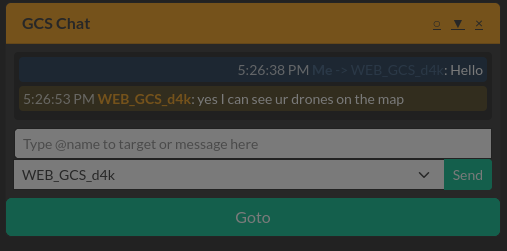
GCS Chat is a messaging panel that lets you send text messages to other GCS operators connected to the same Andruav server. You can broadcast messages to all GCS units or target specific operators.
How to Use
Opening the Chat Panel
The GCS Chat panel appears as a draggable window on your screen. You can move it anywhere by dragging the header bar.
Sending Messages
Type your message in the input field at the bottom of the panel
Choose your target using the dropdown selector:
All GCS: Sends your message to all connected GCS operators
Specific GCS: Select a specific operator by name
Click Send or press Enter to send your message
Using @ Mentions
You can also target specific operators using @ mentions:
Type
@followed by the operator’s name or IDA dropdown will appear with matching operators
Select the one you want to message
Example:
@WEB_GCS_d4k Hello, how's the mission going?
To broadcast to all GCS using mentions, type @all or @gcs.
Message Display
Your messages appear on the right side (blue)
Messages from others appear on the left (orange)
Each message shows the sender’s name and timestamp
The chat automatically scrolls to show new messages
Minimizing the Panel
You can minimize the chat panel to save screen space:
Click the minimize button in the header
When minimized, an asterisk (*) appears in the title if you have unread messages
Click again to expand and read new messages
Tips
Use @ mentions for quick targeting without changing the dropdown
The chat remembers your message history during the session
Unread messages are highlighted when the panel is minimized
All messages are timestamped for easy reference