Backend-Servers Installation
The easiest backend is one Raspberry Pi: airgap.local. The Pi runs all the servers, and it makes its own Wi-Fi network. Laptops, vehicles and ground stations connect to this Wi-Fi. No internet is necessary.
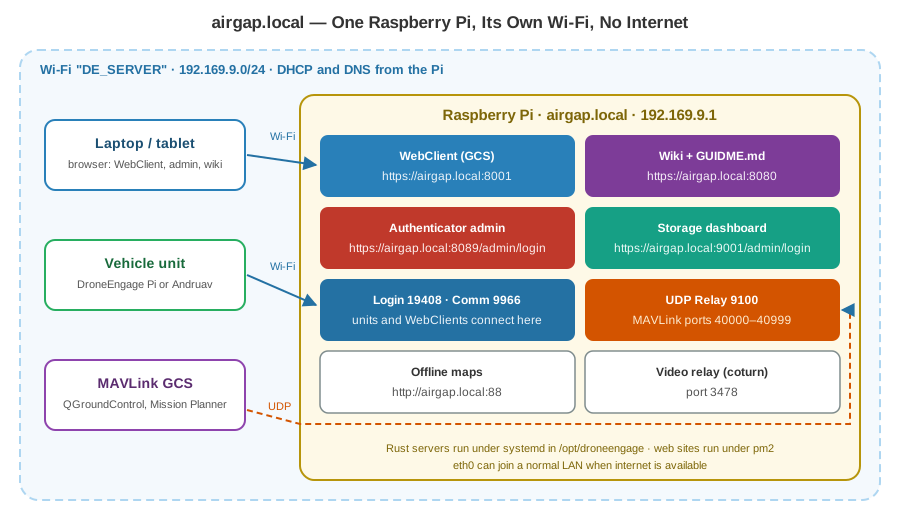
The backend can also run on many machines, with load balancing and fail-over. See Air-Gap Server: The Four Rust Servers for the four servers and their config files.
Connect to airgap.local
Connect your laptop or tablet to the Wi-Fi DE_SERVER.
The Pi gives your device an IP address in
192.169.9.0/24. The Pi is192.169.9.1.Open a browser and use the addresses below.
Service |
Address |
Who uses it |
|---|---|---|
WebClient (GCS) |
|
Operators |
Wiki and GUIDME.md |
|
Everybody |
Authenticator admin |
|
Administrator |
Storage dashboard |
|
Administrator |
Offline maps |
|
The WebClient |
SSH |
|
Administrator |
Note
The certificates are self-signed, so the browser shows a warning. Install the root certificate on each device to stop the warning. See Air-Gap RPI-4 with Access Point.
Tip
Andruav on a phone may not know the name airgap.local. Use the IP
192.169.9.1 on the phone.
Read GUIDME.md First
Each air-gap card has a guide file: GUIDME.md. It describes this card exactly: what is installed, what runs, the ports, the accounts and the rules.
Open it in a browser: https://airgap.local:8080/GUIDME.md
Or read it on the Pi:
/home/pi/GUIDME.md
GUIDME.md contains:
Section |
What it tells you |
|---|---|
Network |
The host name, the Wi-Fi name, the IP addresses, DHCP, DNS and SSH. |
Services and ports |
Each server, its port and how it runs (systemd or pm2). |
Admin URLs and logins |
The admin pages, where each default login is defined, and that you must change them. |
Accounts |
The logins of the card and the role of each login. |
Home folder layout |
Where the WebClient, the wiki, the maps, the scripts and the certificates are. |
Offline maps |
How to fill the map folder. |
Rules for the AI |
What an AI assistant must not do on this card. |
Tip
Use an AI assistant on the Pi. Tell your assistant: “Read https://airgap.local:8080/GUIDME.md first.” The file gives it the layout of the card and its safety rules. For example, it must never show passwords or keys, and it must not delete the Wi-Fi profile or the maps.
Accounts on the Card
The card has five logins in one team. All of them see the same units.
Login |
Role |
|---|---|
|
Administrator. All permissions. |
|
Administrator. All permissions. |
|
Ground station. All actions. It cannot log in as a unit. |
|
Vehicle unit login. |
|
Ground station, view only. |
The passwords are not in this wiki. Ask the person who prepared the card.
Warning
Change the default admin passwords of the Authenticator and the Storage dashboard before a real deployment. GUIDME.md tells where each one is defined. See Air-Gap Server: The Four Rust Servers.
Check the Servers
Connect with SSH. Then run:
systemctl is-active de_auth de_comm de_storage de_udp_relay
pm2 list
ss -tln
Each server must show active. pm2 list must show de_web_server
and de_wiki.