Communication Server
The Communication Server is the real-time messaging backbone of DroneEngage. It relays WebSocket messages between drone units and Ground Control Stations, and it can form a server-to-server mesh for scalable deployments.
What It Does
Accepts persistent WebSocket connections from drone units and GCS clients.
Routes messages by group or individual target.
Provides server-to-server (S2S) relay for multi-region or redundant setups.
Offers a UDP proxy for MAVLink and other UDP protocols.
Persists tasks and, optionally, message history via MySQL.
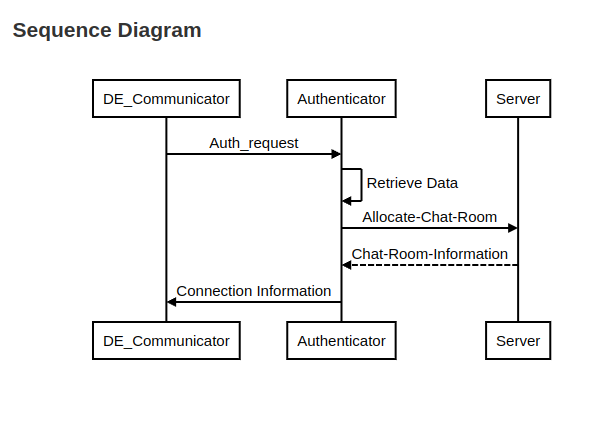
The communication server maintains a persistent WebSocket connection to the authenticator. When a drone or web client authenticates, the authenticator requests the communication server to generate a temporary login key. The client then uses this key to establish a WebSocket connection to the communication server.
Deployment Modes
Standalone — single server for local or small deployments.
Child server — connects to a parent server for relay.
Parent (super) server — accepts child connections and forwards messages across the mesh.
Source Code: https://github.com/DroneEngage/droneengage_communication
Web UDP Telemetry is part of the communication server.
Settings
- Settings is defined in a file called server.config the most important fields are:
server_id: Defines name of the communication server.
server_ip: Defines ip that is the server is listening to. default: “::”
public_host: This is the ip or domain name of the server from the view points of DroneEngage units and webclient.
server_sid: A fixed unique number given to the server, as the system allows multiple communication servers to run together.
server_port: Defines the port that is the server is listening to. default:9966
enable_SSL: Sometimes you want to skip the SSL connection validation, due to constraints in your network.
s2s_ws_target_ip: This is the ip of Authentication Server. This is a websocket connection between Authentication Server and Communication Server.
s2s_ws_target_port: This is the port for the same websocket connection between Authentication Server and Communication Server.
{
    "server_id"                     : "DE_Lap",
    "server_ip"                     : "::",
    "public_host"                   : "airgap.droneengage.com",
    "server_sid"                    : 0,
    "server_port"                   : 9966,
    "enable_SSL"                    : true,
    "s2s_ws_target_ip"              : "127.0.0.1",
    "s2s_ws_target_port"            : "19408",
    "ssl_key_file"                  : "./ssl/privkey.pem",
    "ssl_cert_file"                 : "./ssl/fullchain.pem",
    "allow_fake_SSL"                : true,
    "ca_cert_path"                  :"/home/pi/ssl/root.crt",
    "ignoreLoadingTasks"            : true,
    "command_plugin"                : "./js_andruav_command_processing",

    "allow_udpproxy_fixed_port"     : true,

    "ignoreLog"                 : true,
    "log_directory"             : "./logs/",
    "log_timeZone"              : "GMT",
    "log_detailed"              : true

}
Warning
Although above is a JSON file but you can add comments to the code using // and /* */ blocks.
For Developers
Runtime: Node.js 18+.
Stack: Express,
ws, MySQL2, Ed25519 S2S auth.Key files: -
server.js— main entry point. -server/js_andruav_comm_server.js— WebSocket server. -server/chat_server/js_chat_routing.js— message routing. -server/server_to_server/js_s2s_auth.js— Ed25519 S2S authentication.Configuration:
server.config(JSON, supports--configoverride).
See Server Technicals for routing, S2S relay, and configuration details.