Camera Naming & Virtual Devices (v4l2loopback)
When multiple cameras are connected to a drone, accessing them by name ensures that the same camera is always referenced, even if the device index changes. This is essential when assigning specific cameras to dedicated tasks.
DroneEngage features a robust camera management system that supports running multiple de_camera modules across different boards. Each board can host its own set of cameras, accessible by name. The only requirement is to assign unique names to all cameras. All de_camera modules communicate with the de_comm Communicator Module, which consolidates them into a single unified list accessible via the WebClient.
Renaming Cameras in de_camera
In the config file of the de_camera.config.module.json, you can define cameras by name.
"camera": {
    "camera_list": [
        {"name": "FrontCam", "device_name": "Logitech Webcam C920"},
        {"name": "WingCam", "device_name": "Logitech Webcam C922"}
    ]
}
When accessing cameras from the WebClient, the list displays the defined names rather than device numbers. These names consistently map to the correct camera regardless of connection order.
All other discovery options remain available, such as listing all cameras:
"camera": {
    "camera_start_index": 0,
    "camera_end_index": 31
}
This configuration lists all video devices from /dev/video0 to /dev/video31, regardless of type. It is useful for discovering all video devices on the system when their exact names are unknown.
Device numbers can also be used with custom display names:
"camera": {
    "camera_list": [
        {"name": "FrontCam", "device_num": "/dev/video1"},
        {"name": "WingCam", "device_num": "/dev/video2"}
    ]
}
Linux also supports udev rules, which allow devices to be renamed based on their properties without requiring DroneEngage-specific configuration.
Video Pipelining
Named video devices enable advanced video pipelining. DroneEngage creates the following default virtual video devices:
DE-CAM1, DE-CAM2, DE-TRK, DE-RPI, DE-THERMAL, DE-AI, DE-GIMBAL
DE-RPI is the virtual camera device that streams Raspberry Pi Camera video. Capturing from this device provides the Raspberry Pi Camera feed.
DE-THERMAL is the virtual camera device that DroneEngage stream video of the Thermal Camera to. The original code is here
DE-TRK is the output of the tracking module, displaying bounding boxes around tracked objects.
DE-AI is the output of the AI module, displaying bounding boxes around detected objects.
This approach enables chaining multiple modules together to create complex video pipelines.
Camera Manager Wrapper
For Raspberry Pi deployments, DroneEngage provides a Camera Manager Wrapper that orchestrates the startup, monitoring, and graceful shutdown of camera pipelines and tracking modules.
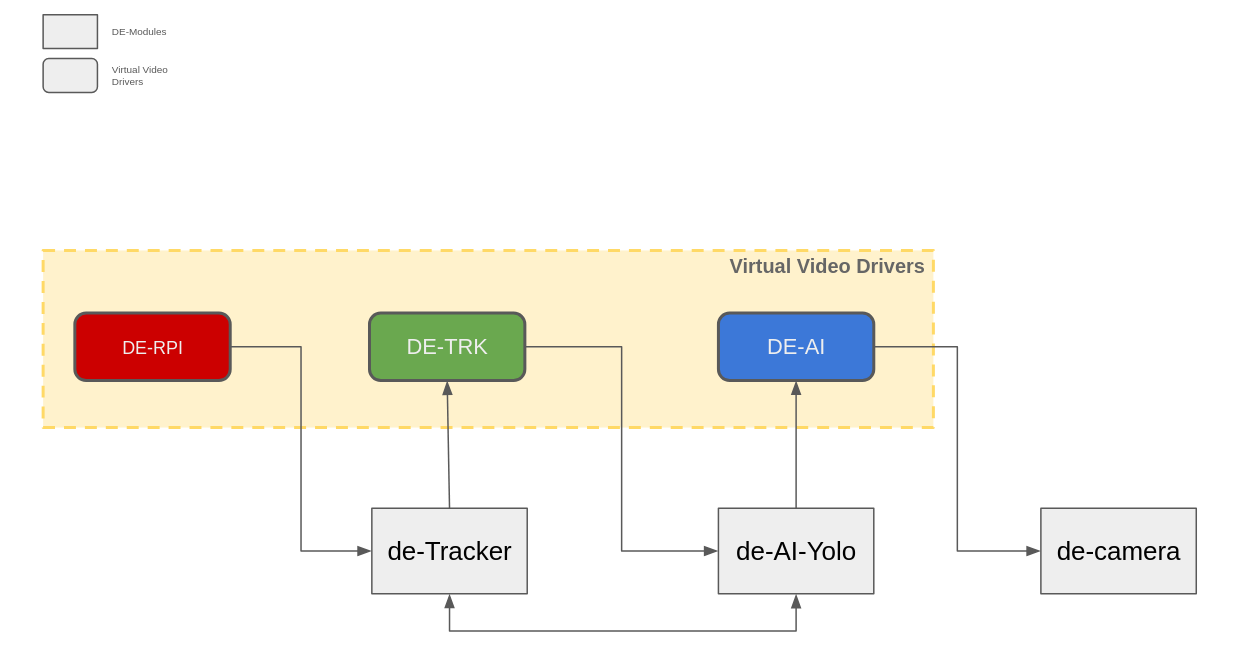
The wrapper supports:
Process Management: Forks and monitors child processes for camera pipelines (
rpicam-vid | ffmpeg), gimbal RTSP streams, tracking modules (de_tracker,de_ai_tracker,de_yolo_generic), and the main camera module (de_camera)Triple AI Architecture: IMX500 hardware AI, HAILO software AI, and generic YOLO AI processing
Virtual Camera Setup: Automatically loads
v4l2loopbackkernel module to create named virtual cameras (DE-CAM1,DE-CAM2,DE-TRK,DE-RPI,DE-THERMAL,DE-GIMBAL)Configurable Delays: Custom startup delays for each module for precise timing control
Gimbal Camera Support: RTSP gimbal camera pipelines with DE-GIMBAL virtual camera output
See the Camera Manager Wrapper documentation for detailed usage examples and configuration options.