
Architecture and Design
This page tells how DroneEngage Studio is built. Read it before you write your own scenario (Design Your Own Scenarios).
The main idea
The Studio does not imitate DroneEngage. It starts the real
programs and wires them together on 127.0.0.1:
one ArduPilot SITL for each vehicle (the simulated flight controller),
the real DroneEngage modules for each vehicle (
de_comm,de_mavlink, and others when a block asks for them),a DroneEngage server stack (real, fake, or your own).
Then a script (the scenario) drives the fleet as an operator does: it deploys missions, arms, starts, injects faults, and at the end checks the evidence. Everything is local, so the Studio needs no internet and no root access.
The composition tree
Everything in the repository answers one of three questions:
COMPOSE - what exists: the things you build.
EXECUTE - why you run it: the run files.
SUBSTRATE - where it runs: the host SITL, the dev server stacks, Raspberry Pi and ESP32 hardware, Android phones.
       modules/catalog.yaml        how each DE module starts
                |
                v
         blocks/<name>/            ONE unit type: which flight
         (block.yaml + overlays)   controller, which modules, which config
                |
                v
         sims/<name>.yaml          a FLEET: blocks together,
                |                  placement, server choice
                v
     +----------+-----------+
     |                      |
tests/**/*.yaml      scenarios/{demos,examples,challenges}/
(machine-checked)    (human-run)
     |                      |
     +----------+-----------+
                |
  a de.scenario/1 RUN FILE: fleet -> timeline -> assert

  worlds/     seeded ground truth: people, phones, canopy, wind
  packages/   the missions (operations) that the fleet deploys
Modules - modules/catalog.yaml
The catalog defines each DroneEngage module one time: its repository
folder under DE_CODE, its binary, its base config template, and how
the engine wires it to de_comm and to the flight controller. To add
a new module type, you add a catalog entry. You do not change the
engine.
Blocks - blocks/<name>/block.yaml
A block is a recipe for one unit type. Example: the copter
block.
description: |
  Quad copter: ArduCopter SITL + de_comm + de_mavlink. The base block for
  most fleets; extend it for copter variants.
modules: [de_comm, de_mavlink]
fc:
  vehicle: copter        # copter | plane | rover
  model: quad            # SITL -M
A block can extends: another block and add or remove modules
(add_modules, remove_modules). It can also hold config overlays
for each module (de_comm.json, de_mavlink.json …) and a
sitl.parm file. ./sim blocks lists all blocks. ./sim block
<name> shows one block after the extends chain is applied.
Sims - sims/<name>.yaml
A sim is a fleet: blocks, unit names, positions and the server
type. Example: sims/copters3.yaml.
version: 1
audience: core
requires: []
units:
  - {block: copter, name: copter, count: 3}     # copter1..copter3, 20 m apart
--with <name> applies an overlay from sims/overlays/ on top of a
sim (another server, more units, config changes). ./sim show
<sim.yaml> prints the result and starts nothing.
Run files - de.scenario/1
A run file is one YAML file. It holds the fleet, the operation, the
operator policy, a timeline of steps and faults, and the assertions.
tests/ holds the files that CI runs. scenarios/ holds files for
people to run, watch or copy. Both use the same format. The format is
strict: the loader checks each file against
engine/de_scenario.schema.json and refuses unknown keys before it
starts anything.
# <name> - one paragraph: what the scenario rehearses and what PASS proves.
version: 1
name: my_scenario
transport: fake          # fake | real | {type: real, link_proxy: true}
operation: ../packages/copter_square.json
settle_s: 20
fleet:    [...]          # or  sim: copters3
timeline: [...]          # {t: <s>, do: <step>} and {t: <s>, fault: <kind>}
assert:   [...]
teardown: land           # land | reset | none
All do: steps, fault: kinds and assert: checks are declared
one time in engine/registry.py. ./sim verbs prints that list.
Design Your Own Scenarios shows how to write a file step by step.
Worlds - worlds/*.yaml
A world is seeded ground truth: people, phones, vehicles, canopy,
buildings, wind, light, and camera and SDR models. Stub modules
(stub_ai_box, stub_sdr, stub_payload, stub_precland)
read the vehicle position and the world, and send the same messages as
the real sensor modules. The runner writes the truth to
truth.jsonl. So “did the fleet find the person?” becomes a real
assertion (detection_recall, coverage_complete,
distance_to …).
Config layers
The Studio generates the config for each module of each unit. Later layers win:
the module base template (from its repository
*.config.module.json),the catalog
set:defaults,the overlays down the block
extendschain,the per-unit
config:in the sim or scenario,the engine wiring: ports, ids, server, state files and journal folder. No block can change these.
The generated files go to var/run/<sim>/. The Studio never reads or
changes the server.config or *.local files of your own
repositories.
Server stacks
The server: key of a sim (or transport: in a scenario) selects
the server stack.
|
What runs |
Use it for |
|---|---|---|
|
|
real message routing |
|
the real server and |
the login path |
|
the real server, and one |
byte-level link faults on real routing |
|
|
seeded packet loss, delay, cuts and clock faults |
|
nothing; the units join a stack that you run
( |
your own servers, phones, boards |
With a real or external server, engine/gcs_bridge.py holds one GCS
session and serves the same control protocol as the fake server. So
./sim ctl works the same way on all stacks.
Important
Which faults need which stack. Link faults (link_cut,
link_stall, link_profile, delay) need fake, or
real with link_proxy: true. Message-level loss (loss,
loss_tx, loss_rx) and clock faults (server_clock,
no_time_sync) need fake only, because a byte relay cannot see
inside a TLS stream. The fake server exists only for these faults.
Use the real server for all other tests.
Fault proxies
The Studio puts small proxies on the links of a unit. Each proxy belongs to one unit, so a fault touches only that unit.
SITL (flight controller)
  |
[fcb_proxy]      FC link       -> fcb_* faults
  |
de_mavlink
  |
[udp_chunks]     module bus    -> udp_chunks faults
  |
de_comm
  |
[link_proxy]     server link   -> link faults (or the fake server)
  |
DroneEngage server
Link proxy (engine/link_proxy.py)
Sits between a unit’s de_comm and the real server’s wss port.
It relays the bytes and uses the same seeded link model as the fake
server: stall, Gilbert-Elliot bursts, bandwidth cap, jitter, delay and
cut. Turn it on with transport: {type: real, link_proxy: true}.
FCB proxy (engine/fcb_proxy.py)
A MAVLink-aware TCP proxy between de_mavlink and the SITL flight
controller port. Turn it on with fcb_proxy: true on a fleet unit.
It gives the fcb_* faults and steps:
fcb_cut- close the flight controller link for a time,fcb_stall- hold the link silent, then let the buffered data flow,fcb_rate- pace the link at a UART baud rate,fcb_corrupt- seeded byte drop and bit flip noise,fcb_inject,fcb_capture,fcb_stats- inject frames, capture frames, read counters.
fcb_link: {kind: pty, baud: 57600} makes de_mavlink open a
virtual serial device (bridged into SITL through the fcb proxy)
instead of a TCP connection. Then fcb_unplug and fcb_plug
remove and replug that device, as a loose cable does.
Module bus proxy (udp_chunks)
The udp_chunks step and fault put seeded drop, reorder and
duplicate faults on the UDP link between one module and de_comm. It
works on all transports.
SITL vehicles
Block or |
What runs |
How |
|---|---|---|
|
ArduCopter SITL ( |
LAND |
|
ArduPlane SITL + |
a plane cannot land in place, so it gets a |
|
ArduRover SITL + |
HOLD + disarm |
|
ArduRover SITL with the |
HOLD + disarm |
|
|
nothing to land |
Other blocks build on these: copter_camera, copter_lowbat,
copter_precland, camera_fixed, android_copter and more.
./sim blocks lists them all.
Speed-up. Scenario runs fly SITL at --speedup 3 by default. Only
the SITL physics clock goes faster. The modules stay on wall-clock time.
A scenario sets speedup: 1 or realtime: true when it needs real
time (timing assertions, rendered cameras, closed module loops).
How a run drives the real modules
When you do ./sim run <file>, the engine does these steps:
Load and check. It reads the file, applies
sim:overlays, and checks the schema and the referenced files.Generate. It resolves blocks, gets ports from the machine-wide port allocator (
./sim portsshows them), and writes the configs and launch scripts tovar/run/<sim>/.Bring up. It starts the server stack, SITL,
de_command the other modules for each unit, from the binaries in yourDE_CODErepositories. It waits until each module is ready.Verify (optional). With
verify:, it runs the deploy gate on the operation before it deploys.Timeline. The clock starts. The runner does each step at its
t. Operator actions (deploy,start,abort, approvals) go through the operator bot (engine/operator_bot.py), one GCS session that acts like the person at the ground station. Faults go to the proxies, the fake server, or the SITL parameters.Record. All the time, the engine records link changes, flight controller telemetry, process ids and memory, and world truth.
Assert. It checks each assertion against the evidence.
Teardown. It lands, resets or leaves the fleet (
teardown:).
The unit journal is the main evidence. It is a diary that
de_comm writes for each unit: missions started and completed, link
offline and online, handlers fired. Most assertions read it.
You can watch a run live in the WebClient RUN view. It shows the phase, a timeline for each unit, the collaboration diagram and the story (the journal lines in time order).
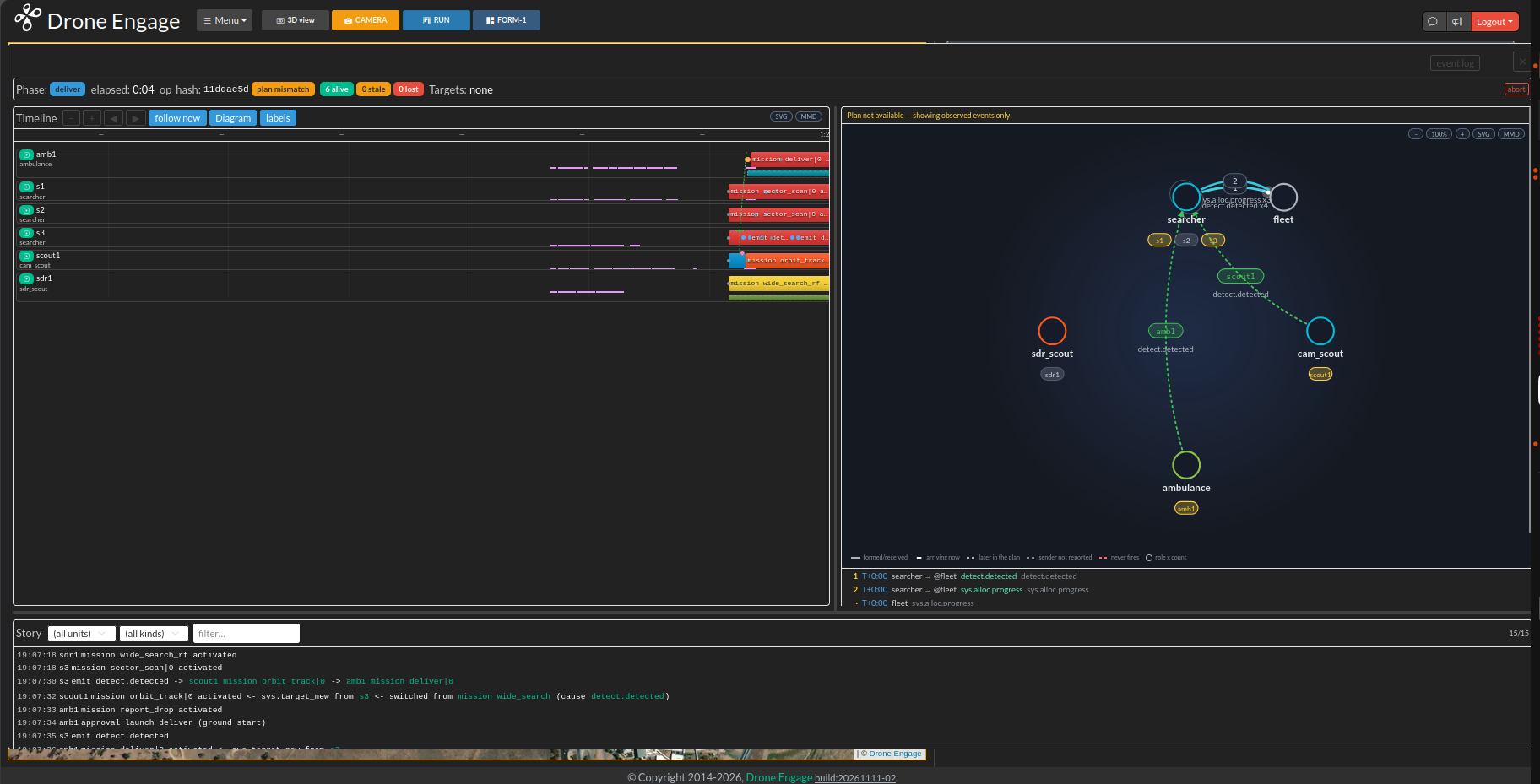
The WebClient RUN view during sar_fleet_a. Left: the timeline of
each unit and its missions. Right: the collaboration diagram. Bottom:
the story, one journal line for each event.
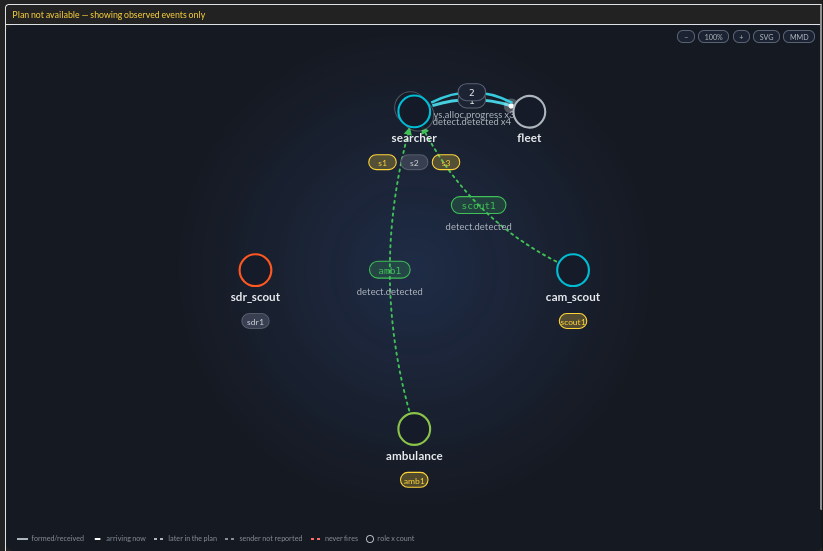
The collaboration diagram: who talks to whom. Each circle is a role
(searcher, cam_scout, ambulance …) with its units
below it. Each arrow is an event, for example detect.detected.
Evidence folder
Each run writes var/results/<utc>/<name>/:
File |
Contents |
|---|---|
|
the verdict: PASS/FAIL/SKIP for each assertion, commit ids of each component, speed-up, wall time, exit code |
|
the same result for CI tools |
|
each unit’s journal and module logs |
|
link up and down changes that the monitor saw |
|
flight controller samples for each unit (the tlog) |
|
the decisions of the operator bot |
|
process id, memory and open files, one row each second |
|
world ground truth, when the scenario has a |
|
the deploy gate result |
The last line of a run is RESULT <dir>/summary.json. Tools and AI
agents read that line to find the report (docs/MACHINE_API.md in the
repository gives the JSON shapes).
Tiers
Tier |
Meaning |
|---|---|
|
SITL only, always green. The |
|
needs a stated capability ( |
|
measures your own hardware ( |
|
private developer content kept outside the repository under
|
Separate from the audience tiers, tier: smoke marks the fast
first-pass set that ./sim suite --tier smoke runs.
Next step: Design Your Own Scenarios.