Andruav SMS Reporting & Control
The phone on the vehicle can send and receive SMS. Use SMS when the internet link is slow or lost:
Send a command to the vehicle, for example RTL or LAND.
Get the location of a lost vehicle.
Start a step of a DroneEngage mission with a keyword.
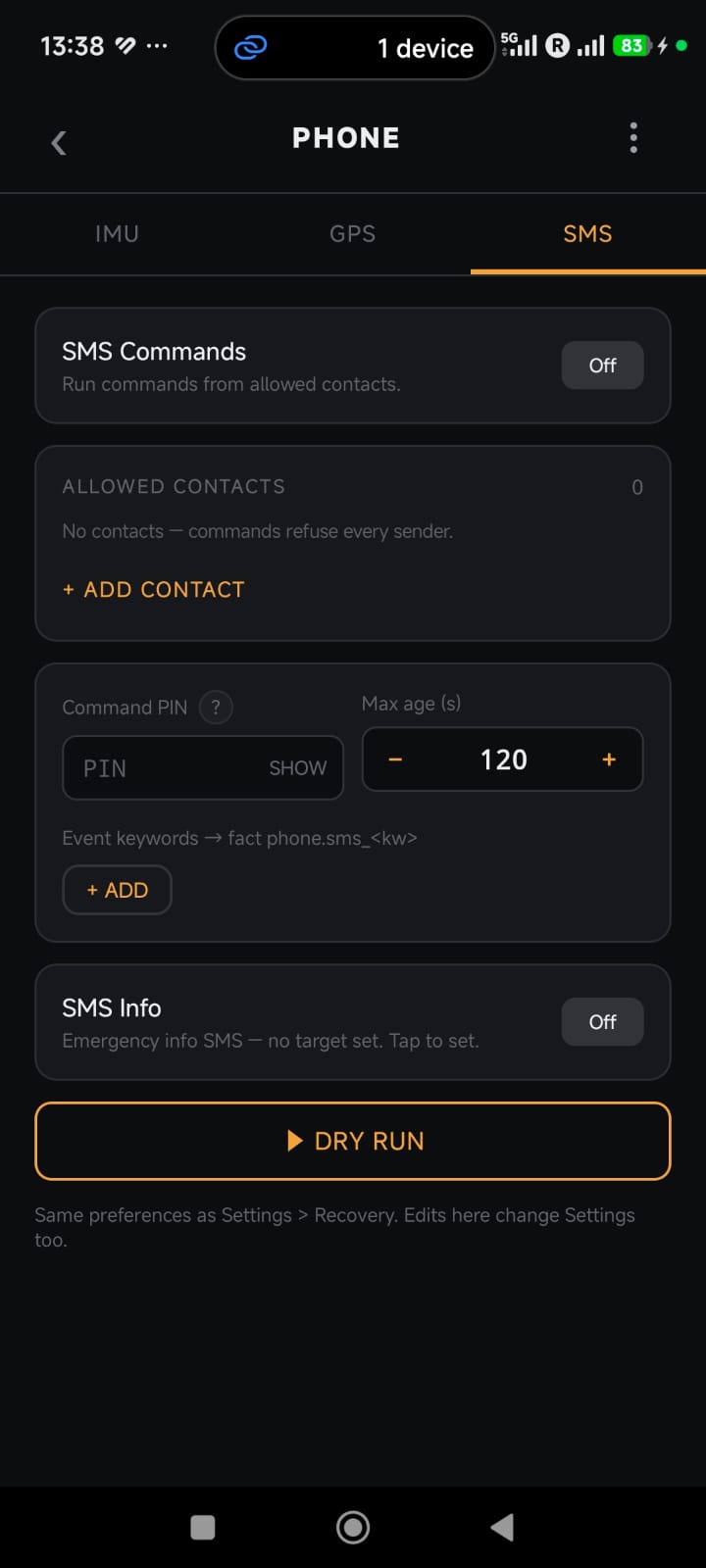
Open the SMS Settings
On the home screen, tap the PHONE tile.
Tap the SMS tab.
The SMS tab and Settings > Recovery use the same values. A change in one place changes the other place too.
Set Up SMS Commands
Each command must pass all of these checks. If one check fails, Andruav does not do the command.
Check |
Rule |
|---|---|
SMS Commands |
The switch must be On. |
Allowed contacts |
The sender must be on the list. With no contacts, Andruav refuses every sender. |
Format |
The message must be |
Command PIN |
The PIN in the message must be correct. The PIN has a maximum of 4 digits. |
Lockout |
After 5 wrong PINs in 10 minutes, Andruav refuses all commands for 10 minutes. |
Max age |
The SMS must not be older than this time (default 120 s). An old SMS that arrives late is not used. |
Steps:
Turn on SMS Commands.
Tap + ADD CONTACT. Add the phone number of each person who can send commands.
Type a Command PIN.
Set the Max age, if necessary.
Tip
Each accepted or refused SMS shows as a message in the WebClient. The message shows the contact name, not the phone number.
SMS Commands
Message |
What it does |
|---|---|
|
Sends back the list of commands. |
|
Sets the flight mode to RTL (Return to Launch). |
|
Sets the flight mode to LAND. |
|
Sends back the location of the vehicle. |
|
Starts the AUTO mission at step 3. |
|
Sends a keyword event to the DroneEngage mission (see below). |
Example: to send the vehicle home with the PIN 1234, send
ATT:RTL:1234.
Note
If the RC block is active (a pilot has manual control), Andruav does not do RTL or LAND from SMS.
Keywords for Missions
You can add your own keywords. A keyword does not move the vehicle by itself. It gives an event to the DroneEngage mission, and the mission decides what to do.
Under Event keywords, tap + ADD.
Type a word, for example
go.In the mission, use the fact
phone.sms_go.
When an allowed contact sends ATT:go:<PIN>, the fact phone.sms_go
becomes true in the mission.
A keyword cannot have the name of a built-in command, such as rtl.
SMS Info
SMS Info sends an emergency SMS with the location of the vehicle to one phone number.
Tap the SMS Info card.
Type the phone number that gets the emergency SMS.
Turn on SMS Info.
Test with DRY RUN
Before a flight, test your setup with DRY RUN. The dry run does not move the vehicle.
Tap DRY RUN.
Select a sender and a message.
Read the result. It shows each check and if it passed or failed.
Warning
SMS can arrive late or not at all. Do not use SMS as your only safety link. Also set the comm-loss failsafe.