
DroneEngage Studio
DroneEngage Studio (repository droneengage_studio, also called
Engage Studio) is the simulation and test environment for DroneEngage.
It flies simulated copters, planes, rovers and boats on one computer.
Each simulated vehicle runs the real DroneEngage modules
(de_comm and de_mavlink) and talks to a real or a fake
DroneEngage server. You do not need a drone, a radio or root access.
You use one command for everything: ./sim.
Start a fleet and look at it in the WebClient.
Run a scripted test and get a PASS or FAIL result with evidence.
Break things on purpose: cut a link, jam the GPS, kill a module, stop the server. Every fault has a seed, so you can repeat the run.
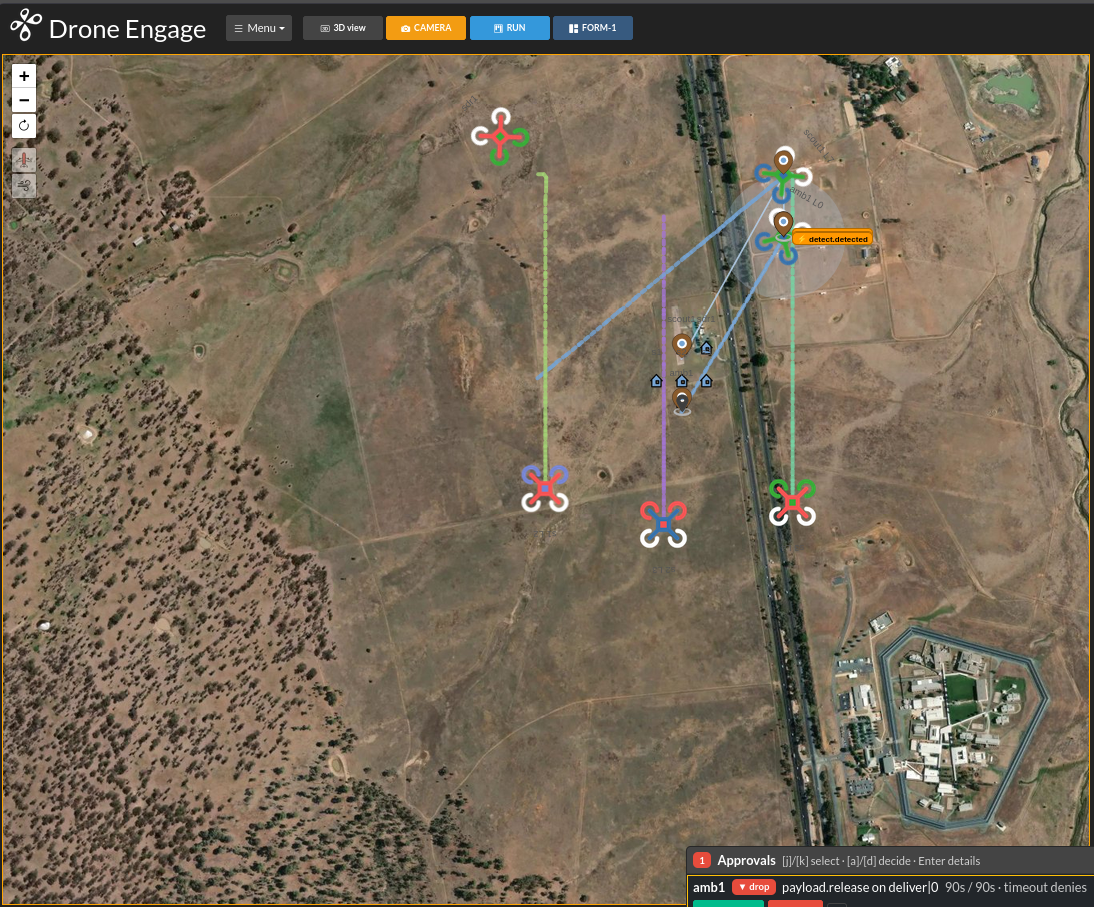
The sar_fleet_a search and rescue demo in the WebClient. The
scout drones fly to the detect.detected point. The ambulance
drone amb1 asks the operator to approve the payload drop.
Read the pages in this order:
Which page do I need?
I want to… |
Read |
|---|---|
install the Studio and see a test pass |
|
know how the Studio is built and what a server stack is |
|
write a new test for my own feature |
|
ask an AI assistant to write or fix a scenario |
Note
These pages give the main facts. The full reference is in the
Studio repository: README.md, wiki/USER_GUIDE.md and
docs/SCENARIOS.md. ./sim help shows every command and
./sim <command> --help shows its flags.