DroneEngage SWARM
The DroneEngage SWARM system is designed to facilitate the coordination and management of drone formations. Each swarm comprises a single leader drone and multiple follower drones, enabling efficient operation in various scenarios.
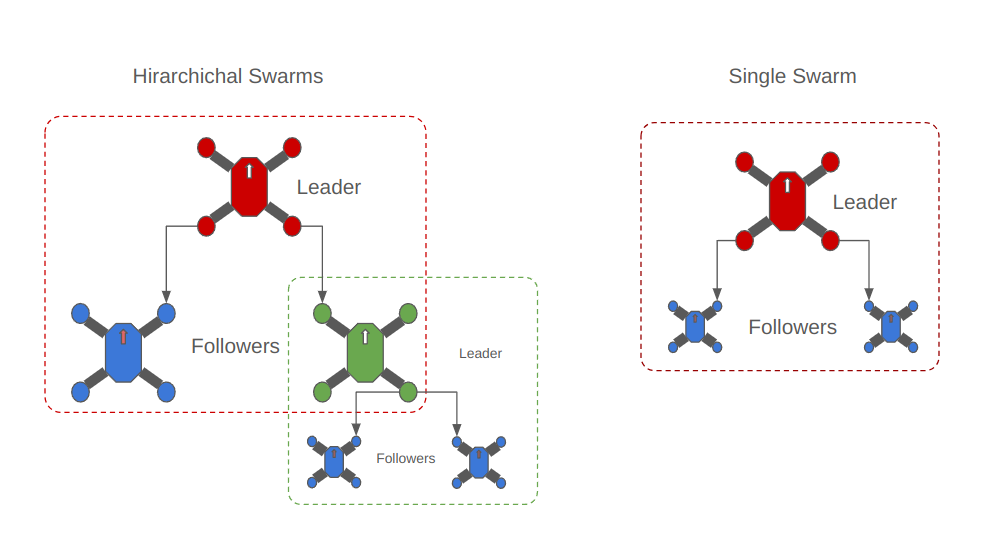
The following diagram shows the main logic of SWARMS in DroneEngage.
Features
SWARM Composition: Each swarm consists of one leader drone and multiple follower drones.
Formation Management: Each swarm maintains a specific formation, with each follower assigned a unique position referred to as its index.
Hierarchical Structure: Follower drones can assume the role of leaders within their own sub-SWARMS, creating a hierarchical organization. This allows for complex operational strategies where each follower can have its own set of followers.
Independent Operation: Grandchildren followers operate independently from their grandparent leader. This allows for flexibility and autonomy during missions.
Dynamic Formation: The swarm formation can be adjusted dynamically during execution, enabling real-time adaptations to changing circumstances.
Formation Types
The DroneEngage SWARM supports the following formation patterns:
No Swarm (0): Default state, no active formation
Thread Formation (1): Followers follow in a line behind the leader, maintaining a rope-like distance effect based on their index position
Arrow Formation (2): Followers form a V-shaped pattern behind the leader, alternating left and right sides
Vector Formation (3): Formation based on vector direction (requires angle parameter)
Technical Architecture
The swarm system is implemented using three main C++ classes:
- CSwarmManager
Central manager handling leader/follower relationships
Manages swarm state and formation configuration
Handles message routing between leader and followers
Maintains lists of follower units with their indices
- CSwarmLeader
Leader-specific logic for sending updates to followers
Broadcasts position and attitude data to followers
Implements formation-specific update logic
Runs at 1Hz update rate (configurable)
- CSwarmFollower
Follower-specific logic for receiving leader data
Calculates target positions based on formation type and index
Processes MAVLink messages from leader
Implements rope-effect for thread formation and V-pattern for arrow formation
Distance Parameters
The swarm system uses configurable distance parameters:
KNODE_LENGTH: Default distance unit (100m)
Min Horizontal Distance: Minimum horizontal spacing between drones (default: 100m)
Min Vertical Distance: Minimum vertical spacing between drones (default: 100m)
These parameters can be configured via message commands (h: horizontal, v: vertical) when making a swarm or joining as a follower.
Unit Roles
Unit-1 is a DroneEngage unit that should be a leader of the swarm. Unit-2 is a DroneEngage unit that should be a follower of the swarm.
Transition to Leader
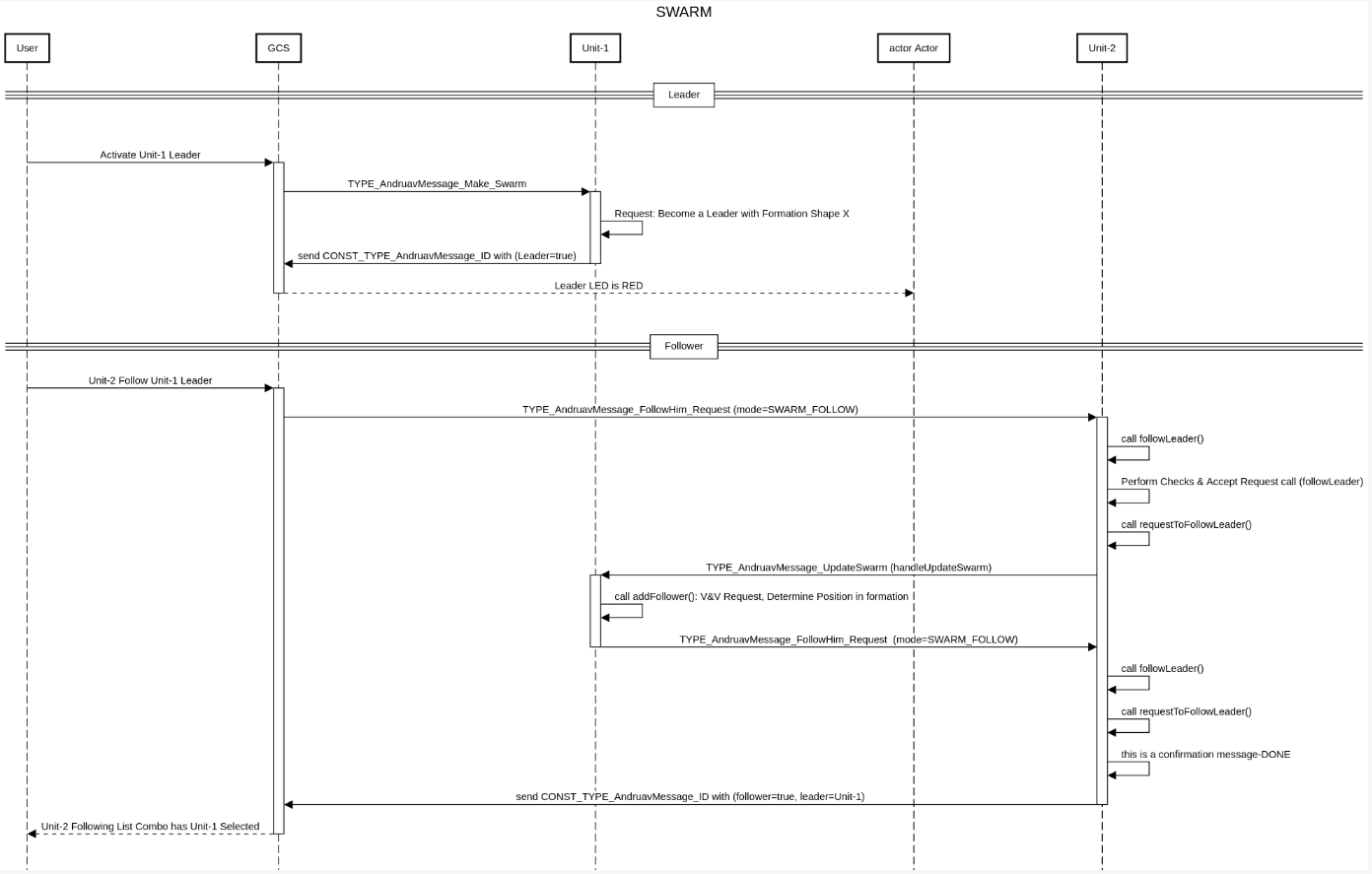
The process for establishing Unit-1 as the leader is as follows:
User clicks on SWARM Leader button to make Unit-1 a leader of the swarm.
WebClient Sends AndruavMessage_Make_Swarm Message to Unit-1.
Unit-1 receives the message and starts the SWARM Leader mode.
Unit-1 sends an updated AndruavMessage_ID to confirm that it is a leader.
Transition to Follower
The process for establishing Unit-2 as a follower is as follows:
The user selects Unit-1 as the leader for Unit-2.
The WebClient sends an AndruavMessage_Join_Swarm message to Unit-2.
Unit-2 receives the message and performs necessary validations, including disassociating from any previous leader, before sending a request to Unit-1 to join the SWARM.
Unit-1 receives the request and determines the appropriate location (index) for Unit-2 within the current swarm configuration.
Unit-1 responds to Unit-2 with the relevant configuration details (formation shape and location within the formation).
Unit-2 receives the configuration reply and, if accepted, sends a confirmation back to Unit-1.
Unit-2 then sends an updated AndruavMessage_ID to confirm its status as a follower.