UDP Relay
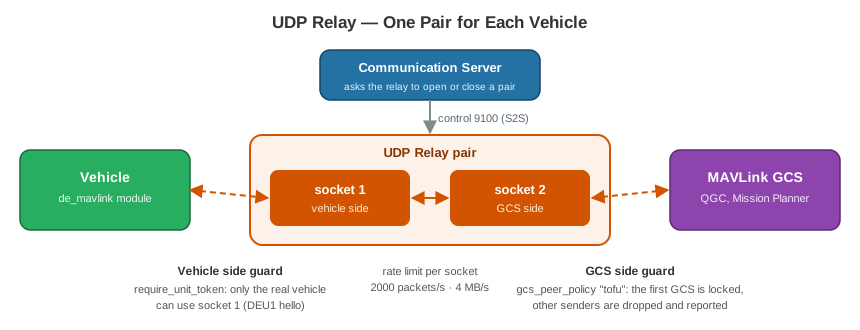
The UDP Relay connects a vehicle to a MAVLink ground station, such as QGroundControl or Mission Planner. The vehicle and the ground station do not need to be on the same network. Each one only needs to reach the relay.
The UDP Relay is optional. The WebClient does not need it. Install it only if you use QGroundControl, Mission Planner or another MAVLink tool.
Program: droneengage-udp-proxy · Source code:
droneengage_udp_proxy
How It Works
In the WebClient, you turn on UDP telemetry for a unit. See Web UDP Telemetry.
The Communication Server asks the UDP Relay to open a pair for this unit.
A pair is two UDP ports. Socket 1 is for the vehicle. Socket 2 is for the ground station.
The
de_mavlinkmodule on the vehicle sends MAVLink to socket 1.You connect QGroundControl or Mission Planner to socket 2.
The relay sends each packet from one socket to the other.
Note
Before, this proxy was inside the Communication Server. Now it is a separate server. A high rate of MAVLink packets cannot slow down the messages of the Communication Server.
Who Can Use a Pair
A ground station that can send to socket 2 can send commands to the flight controller. Thus the relay has guards on the two sides.
Vehicle side — require_unit_token
When it is true, the vehicle must send a DEU1 hello packet with a
secret token. Only the real de_mavlink module has this token. Other
senders cannot use socket 1.
Ground station side — gcs_peer_policy
Value |
Socket 2 accepts |
|---|---|
|
The first ground station that sends. Then the relay locks to it, and drops and reports other senders. This is the recommended value. |
|
Only the IP addresses on the list of the pair. |
|
|
|
All senders. Use it only on a closed network. |
Rate limit — max_pps_per_socket and max_bps_per_socket
The relay drops packets above these limits. One bad sender cannot overload the relay.
Settings
The settings are in server.config. Put your changes in
server.config.local (see Air-Gap Server: The Four Rust Servers).
Setting |
Default |
What it does |
|---|---|---|
|
|
The name of this relay. The Communication Server uses this name. |
|
|
The control port. The Communication Server connects here. |
|
|
|
|
|
Copy the same file from the Storage Server. |
|
|
The IP of the UDP sockets. |
|
|
The IP or name that the vehicle and the ground station use to reach the relay. Change it to the IP of the Pi. |
|
|
The UDP ports of the pairs. Each pair uses two ports. |
|
|
Use the port that the user asks for, if it is free and in the range. |
|
|
The receive and send buffer of each socket (4 MB). |
|
|
Close a pair after this time with no traffic, when its unit is offline. |
|
|
Keep the pairs this long if the Communication Server disconnects. |
|
|
Ask for the |
|
|
The guard on the ground station side (see above). |
|
|
The maximum packets per second for each socket. |
|
|
The maximum bytes per second for each socket. |
{
    "server_id"              : "DE_UdpRelay_1",
    "server_ip"              : "0.0.0.0",
    "server_port"            : 9100,
    "enable_SSL"             : true,
    "ssl_key_file"           : "./ssl_local/ssl_airgap/domain.key",
    "ssl_cert_file"          : "./ssl_local/ssl_airgap/domain.crt",
    "ca_cert_path"           : "./ssl_local/ssl_airgap/root.crt",

    "s2s_cert_enabled"       : false,
    "s2s_shared_secret_file" : "./s2s_shared_secret.key",

    "udp_bind_ip"            : "0.0.0.0",
    "public_host"            : "192.168.1.161",
    "udp_port_range"         : [40000, 40999],
    "allow_fixed_port"       : true,
    "udp_buffer_bytes"       : 4194304,

    "idle_timeout_s"         : 300,
    "owner_grace_s"          : 120,

    "require_unit_token"     : false,
    "gcs_peer_policy"        : "tofu",
    "max_pps_per_socket"     : 2000,
    "max_bps_per_socket"     : 4000000
}
Tip
The relay asks for 4 MB socket buffers. If Linux gives less, add these
lines to /etc/sysctl.conf and restart the Pi:
net.core.rmem_max=4194304
net.core.wmem_max=4194304
Connect the Communication Server
Set the udp_relay list in the config of the Communication Server.
The id must be the same as server_id of the relay:
{
    "udp_relay" : [ { "host": "127.0.0.1", "port": 9100, "id": "DE_UdpRelay_1" } ]
}
If udp_relay is empty or not there, the system has no UDP telemetry.